

A command center, also known as a command and control center or situation center, is a centralized operational hub where critical information is collected, analyzed, and transformed into coordinated decisions, actions, and resource management.
Command Center or Situation Center

- SITUATION CENTERS
- GOVERNMENT CONTROL ROOMS
- CRISIS MANAGEMENT ROOMS
- PUBLIC SAFETY CENTERS
- INTER-AGENCY
COORDINATION - EMERGENCY
RESPONSE CENTERS - EXECUTIVE
BRIEFING ROOMS - PUBLIC
ADMINISTRATION - MONITORING
HUBS - UTILITY
COMMAND CENTERS - TRANSPORT
COORDINATION CENTERS - MULTIPURPOSE
VISUALIZATION CENTERS
Key Challenges in Modern Command Centers
In command and control centers, the challenge is not only seeing more data, but turning scattered inputs into shared context, faster escalation, and coordinated action across teams and agencies.
Critical data stays scattered across platforms and operational tools.
Fragmented Systems

Fixed displays cannot adapt to incidents, briefings, or daily modes.
Static Wall Layouts

Teams spend time finding data instead of acting on incidents.
Prioritization Delays

Teams work without one shared operational picture.
Limited Coordination

Too many dashboards, alerts, and feeds hide critical events.
Information Overload

Connected systems lack operational context and coordinated workflows.
Poor Integration

Improve Operational Efficiency and Decision-Making with Polywall
A command center video wall solution is more than an AV infrastructure layer. Polywall centralizes sources, controls layouts, and supports faster coordination under operational pressure.
1
Bring together dashboards, video conferencing, reports, documents, and media.
Collect
2
Display live information through structured video wall layouts and workstations.
Visualize
3
Give decision-makers shared operational context to evaluate evolving situations.
Assess
4
Adapt layouts, coordinate teams, and support response as incidents evolve.
Coordinate
5
Track system status, layouts, and live updates to maintain situational awareness.
Monitor
Core Polywall Features for Command Centers
Polywall turns command center video walls into active decision-support tools. Teams can manage live sources, adapt layouts, and switch scenarios during daily or crisis operations.
Connect dashboards, CCTV, VMS, SCADA, GIS, applications, and business systems into one command center operational view for teams.
MULTI-SOURCE INTEGRATION
Move between daily operations, incident response, crisis mode, and executive briefings without manual screen rebuilding or delay.
FAST SCENARIO SWITCHING
Connect securely from anywhere – home, office, or on the go – with Polywall Lens, giving decision-makers full interactive control over all sources.
REMOTE COMMAND CENTER ACCESS
Keep displayed information aligned with current events, alerts, live feeds, and changing operational priorities across the room.
REAL-TIME OPERATIONAL UPDATES
Adapt layouts for operators, supervisors, and decision-makers based on roles, priorities, and operational context during active work.
DYNAMIC VIDEO WALL LAYOUTS
Control video walls, operator screens, collaboration displays, and remote users from one software layer across the command center.
VISUALIZATION MANAGEMENT
Polywall Architecture for Command Centers
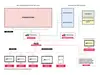
Discover Command Center Success Stories
See how Polywall supports command centers, situation rooms, and public-sector control with flexible visualization and coordination tools.
Explore Other Polywall Control Room Solutions
Polywall supports control room solutions beyond command centers. See how the same software powers NOCs, SOCs, crisis rooms, dispatcher halls, and other mission-critical environments.
Frequently Asked Questions (FAQs)
A command center is a centralized operational environment where teams collect, analyze, and act on real-time information. It is used to coordinate incidents, monitor critical systems, support decision-making, and manage resources across departments, sites, or agencies.
The distinction depends on industry and operating model. In energy, utilities, transport, and industry, control rooms may provide full operational control. Command centers often support coordination, crisis response, executive oversight, and resource allocation.
Polywall command center software helps teams manage visual information across video walls, operator workstations, and briefing areas. It enables multi-source integration, layout control, scenario switching, visual automation, and team alignment.
Polywall supports command centers, situation centers, and government control rooms. It fits crisis management, monitoring hubs, executive briefings, public administration, energy, transport, and enterprise operations.
Related Blog Articles
21.08.2026
Understanding Control Room KVM: Hardware, IP KVM and Browser-Based Control
Seeing a source on the video wall does not always mean users can interact with it. Learn how KVM works in control rooms, where hardware and IP KVM fit, and why software-based, browser-based KVM is becoming important for modern teams.
![[August 25, 2026] [Brazil] AV Hub Tech & Polywall: Control Room Layer for Video Walls](/images/polywall-avhub-webinar-brazil-2026.webp)
20.08.2026
[August 25, 2026] [Brazil] AV Hub Tech & Polywall: Control Room Layer for Video Walls
Join AV Hub Tech and Polywall on August 25 to explore the control room layer and approaches to source interaction, remote access, scenario switching, permissions, and IT alignment.

13.07.2026
New Case Study: Polywall Brings SOC Monitoring Systems Into One View For A Central Bank In Asia
A major Central Bank responsible for regulating one of the largest financial sectors in Central Asia has implemented a Security Operations Center (SOC) powered by Polywall control room software.
20.07.2026
Command Center Best Practices for Reliable, Scalable Operations
Learn how to design and build an effective mission-critical operations hub. This guide explains command center best practices, including workflows, room layout, video walls, control room software, redundancy, SLA support, and business value for 24/7 environments.
Product
Industries
Support
About
© 2026 POLYWALL SOFTWARE SOLUTIONS FZE


/
Speak to an Expert