
Command Center Best Practices for Reliable, Scalable Operations
20.07.2026
Discover what a command center is and why it plays a critical role in real-time decision making, operational control, and cross-functional coordination. This article explains how command centers differ from control rooms and situation centers, and what best practices help organizations design reliable 24/7 environments with video walls, control room software, redundancy, and ergonomic workflows.



Modern organizations operate in increasingly complex environments where critical infrastructure, digital services, distributed teams, security operations, and business processes generate large volumes of real-time data.
Effective command center design helps turn this data into coordinated action by connecting people, processes, technologies, and decisions in one operational workflow.
This environment is not simply a room with displays or dashboards. Its main role is to support decision-making, coordination, and operational control, helping teams understand priorities and respond faster.
Depending on the industry, it may be called a command and control center, control room, or situation center. The name may differ, but the purpose remains the same: collect data, support decisions, and coordinate actions.
Effective command center design helps turn this data into coordinated action by connecting people, processes, technologies, and decisions in one operational workflow.
This environment is not simply a room with displays or dashboards. Its main role is to support decision-making, coordination, and operational control, helping teams understand priorities and respond faster.
Depending on the industry, it may be called a command and control center, control room, or situation center. The name may differ, but the purpose remains the same: collect data, support decisions, and coordinate actions.
“
Many organizations begin projects of this type by focusing on video walls, workstation furniture, or AV equipment. In reality, these decisions should come later. The foundation of a successful operational environment is its operational model: who makes decisions, what information each role needs, how incidents are escalated, and how teams coordinate during both routine operations and crisis situations.
Technology delivers value only when it supports real operational workflows. Operators should never waste time searching for dashboards or switching between disconnected systems. A well-designed control environment combines AV/IT integration, visualization strategy, software orchestration, and human-centered design to reduce complexity, improve situational awareness, and help teams make faster, more informed decisions.
Technology delivers value only when it supports real operational workflows. Operators should never waste time searching for dashboards or switching between disconnected systems. A well-designed control environment combines AV/IT integration, visualization strategy, software orchestration, and human-centered design to reduce complexity, improve situational awareness, and help teams make faster, more informed decisions.
This guide explains the best practices for designing and implementing modern mission-critical operations facilities, including architecture, room planning, visualization strategy, software integration, reliability requirements, and business outcomes.
What Is a Command Center?
A Command Center is a centralized operational environment designed to collect, process, and act on real-time data across an organization, enabling coordinated decision-making, operational control, and resource management.
Unlike traditional monitoring environments, this type of facility does not simply display information. It connects multiple systems, teams, and workflows into a single operational picture where data can be analyzed and transformed into action.
In practice, the environment integrates information from different sources, including SCADA platforms, CCTV and VMS systems, sensors, IT monitoring tools, BI dashboards, alarms, GIS platforms, communication systems, and field reports. The purpose of this integration is not only to improve visibility but also to help teams understand priorities, coordinate responses, and execute decisions faster.
This operational model works through a continuous data-to-decision-to-action cycle:
This operational loop allows organizations to move from passive monitoring to active control. The value of the facility is created when information is connected with decisions and execution — not when data is simply displayed on screens.
A strong command center design should support a decision-support environment. The goal is not to show the maximum amount of information, but to present the right information to the right people at the right moment.
In practice, the environment integrates information from different sources, including SCADA platforms, CCTV and VMS systems, sensors, IT monitoring tools, BI dashboards, alarms, GIS platforms, communication systems, and field reports. The purpose of this integration is not only to improve visibility but also to help teams understand priorities, coordinate responses, and execute decisions faster.
This operational model works through a continuous data-to-decision-to-action cycle:
- Inputs. Data from SCADA, CCTV, sensors, IT systems, BI dashboards, alarms, business applications, and field reports.
- Processing. Data aggregation, filtering, correlation, analysis, and visualization to create meaningful operational context.
- Decision-making. Human interpretation, risk assessment, escalation, prioritization, and selection of the appropriate response.
- Outputs. Commands, field dispatch, resource allocation, workflow execution, or automated actions.
- Feedback. Status updates from connected systems and teams that maintain continuous situational awareness.
This operational loop allows organizations to move from passive monitoring to active control. The value of the facility is created when information is connected with decisions and execution — not when data is simply displayed on screens.
A strong command center design should support a decision-support environment. The goal is not to show the maximum amount of information, but to present the right information to the right people at the right moment.
Who Needs a Command Center and Why It Matters
Organizations adopt centralized operations environments when traditional monitoring tools are no longer enough. The need depends on risk level, coordination complexity, and required decision speed — not company size.
This type of environment is essential for managing real-time operations, distributed infrastructure, incidents, and multi-system visibility. Without a unified view, disconnected dashboards and manual communication can slow response and increase operational risk.
Typical industries that rely on centralized operational environments include:
Despite different applications, these facilities share the same purpose: centralized visibility, faster decisions, coordinated actions, and reduced response time.
For system integrators and AV specialists, this means there is no universal template. Each environment must be designed around workflows, data sources, user roles, visualization needs, reliability requirements, and collaboration scenarios.
The technology foundation usually includes three core elements: real-time data integration, shared visualization through video walls, and software platforms that orchestrate information across the operational environment.
This type of environment is essential for managing real-time operations, distributed infrastructure, incidents, and multi-system visibility. Without a unified view, disconnected dashboards and manual communication can slow response and increase operational risk.
Typical industries that rely on centralized operational environments include:
- Defense and Security — mission coordination, intelligence analysis, operational response, and secure situational control.
- Government and Emergency Services — crisis management, disaster response coordination, public safety operations, and communication between multiple agencies.
- Public Safety — police, fire, EMS, and emergency dispatch organizations use centralized environments for incident management, field coordination, and rapid response.
- Energy and Utilities — grid monitoring, infrastructure management, alarm handling, SCADA-based operations, and continuous control of critical assets.
- Telecom and IT Operations — NOC and SOC teams use centralized environments to maintain service reliability, monitor networks, detect threats, and manage incidents.
- Transportation and Logistics — airports, ports, rail networks, traffic systems, and fleets require real-time coordination, monitoring, and response management.
- Healthcare Systems — hospitals and healthcare networks use operational centers for patient flow management, emergency coordination, capacity optimization, and resource planning.
- Enterprise Operations — large organizations use operations hubs for business continuity, corporate security, IT operations, and executive-level visibility.
Despite different applications, these facilities share the same purpose: centralized visibility, faster decisions, coordinated actions, and reduced response time.
For system integrators and AV specialists, this means there is no universal template. Each environment must be designed around workflows, data sources, user roles, visualization needs, reliability requirements, and collaboration scenarios.
The technology foundation usually includes three core elements: real-time data integration, shared visualization through video walls, and software platforms that orchestrate information across the operational environment.
Command Center and Control Room: Differences, Overlaps, and Industry Usage
The terms command center, control room, command and control center, command and control room, and situation center are often used interchangeably. The difference is not the name, but the operating model: what data is collected, who makes decisions, how teams coordinate, and how responses are executed.
A control room is common in energy, utilities, manufacturing, transportation, and industrial automation, where operators manage processes, alarms, infrastructure, and continuity. A centralized operations hub is more focused on real-time coordination across teams, systems, or departments.
For defense, government, public safety, and other mission-critical environments, command and control center design should prioritize hierarchy, secure communication, rapid escalation, and mission continuity.
In practice, the same environment may be called a control room, NOC, SOC, situation center, or centralized operations facility. The technology foundation is often similar — data integration, dashboards, video walls, communication tools, and operational software — while the difference lies in how teams use it and what decisions it supports.
The technology foundation is often similar — data integration, visualization systems, communication tools, dashboards, video walls, and operational software. The difference lies in how teams use the environment and what decisions it supports.
A control room is common in energy, utilities, manufacturing, transportation, and industrial automation, where operators manage processes, alarms, infrastructure, and continuity. A centralized operations hub is more focused on real-time coordination across teams, systems, or departments.
For defense, government, public safety, and other mission-critical environments, command and control center design should prioritize hierarchy, secure communication, rapid escalation, and mission continuity.
In practice, the same environment may be called a control room, NOC, SOC, situation center, or centralized operations facility. The technology foundation is often similar — data integration, dashboards, video walls, communication tools, and operational software — while the difference lies in how teams use it and what decisions it supports.
The technology foundation is often similar — data integration, visualization systems, communication tools, dashboards, video walls, and operational software. The difference lies in how teams use the environment and what decisions it supports.
Command Center, Control Room, Situation Center, NOC / SOC: Differences
Common usage
Typical industries
Operational focus
Control room
Process and infrastructure operations
Energy, utilities, manufacturing, transport, oil & gas
Monitoring, process control, alarms, dispatch, operational continuity
Command center
Cross-functional operations and coordination
Enterprise, public safety, corporate security, emergency management
Decision-making, coordination, escalation, resource allocation
Command-and-control facility
Mission-critical coordination environments
Defense, government, security, emergency services
Command hierarchy, situational awareness, mission control
Situation center / situation centre
Crisis and executive awareness
Government, corporate security, public sector, large enterprises
Situational overview, crisis response, briefing, strategic decisions
NOC / SOC
Technical operations
Telecom, IT, cybersecurity
Network reliability, cyber monitoring, incident response
Understanding these differences is important during the design phase. The facility name alone does not define the architecture. The required video wall configuration, software capabilities, room layout, redundancy level, and collaboration tools should be determined by operational requirements.
Types of Operational Centers by Industry
There is no universal model for this type of environment: each industry has its own goals, data sources, roles, risks, and design requirements.
Energy control rooms, telecom NOCs, cybersecurity SOCs, emergency operations centers, and enterprise operations hubs may use similar tools — video walls, dashboards, communication systems, and control room software — but their operational models differ.
The core principle is the same: collect data, visualize critical information, support decisions, coordinate actions, and maintain feedback from connected systems or field teams.
Energy control rooms, telecom NOCs, cybersecurity SOCs, emergency operations centers, and enterprise operations hubs may use similar tools — video walls, dashboards, communication systems, and control room software — but their operational models differ.
The core principle is the same: collect data, visualize critical information, support decisions, coordinate actions, and maintain feedback from connected systems or field teams.
Common Types of Operational Centers by Industry
Type
Purpose
Data sources
Users
Design priorities
Energy and utilities control room
Grid, plant, or infrastructure operations
SCADA, sensors, alarms, CCTV, field reports
Dispatchers, engineers, supervisors
Reliability, redundancy, 24/7 ergonomics, direct operational control
Telecom NOC
Network reliability and service continuity
Network monitoring tools, logs, alerts, service dashboards
NOC engineers, shift leads, managers
High-density dashboards, fast escalation, SLA visibility
Cybersecurity SOC
Threat monitoring and incident response
SIEM, EDR, threat intelligence, logs, security dashboards
Analysts, incident responders, SOC managers
Alert prioritization, secure access, incident investigation
Emergency operations center
Crisis response and public safety coordination
GIS, calls, video feeds, field reports, weather data
Dispatchers, public safety teams, emergency managers
Collaboration, crisis mode, communications, field coordination
Transportation center
Traffic, fleet, airport, port, or rail operations
GPS, CCTV, schedules, sensors, traffic systems
Operators, dispatchers, supervisors
Real-time maps, incident response, route and resource coordination
Government or situation center
Crisis awareness and executive coordination
Reports, dashboards, GIS, media feeds, agency systems
Officials, analysts, security teams
Briefing layouts, situational awareness, interagency collaboration
Healthcare operations center
Patient flow and hospital operations
Bed management, emergency data, staffing, equipment status
Hospital operations teams, clinical coordinators
Capacity visibility, emergency response, resource optimization
Enterprise operations hub
Business operations and continuity
BI, ERP, CRM, IT systems, security dashboards
Executives, operations teams, IT and security leaders
KPI visibility, risk awareness, cross-functional coordination
Defense and security center
Mission coordination and situational control
Intelligence feeds, sensors, maps, communications, video
Command staff, analysts, response teams
Secure operations, command hierarchy, mission continuity
For system integrators and AV specialists, this means that command center design should never start with a standard room template. It should start with operational requirements.
The layout, number of workstations, video wall content, software integrations, redundancy level, and collaboration tools must reflect how the facility will be used during normal operations, incidents, and crisis situations.
The layout, number of workstations, video wall content, software integrations, redundancy level, and collaboration tools must reflect how the facility will be used during normal operations, incidents, and crisis situations.
Operational Model of a Command Center
A modern operations environment works as a continuous data-to-decision-to-action loop. Its purpose is not only to display information but to help teams understand situations, make decisions, and coordinate actions in real time.
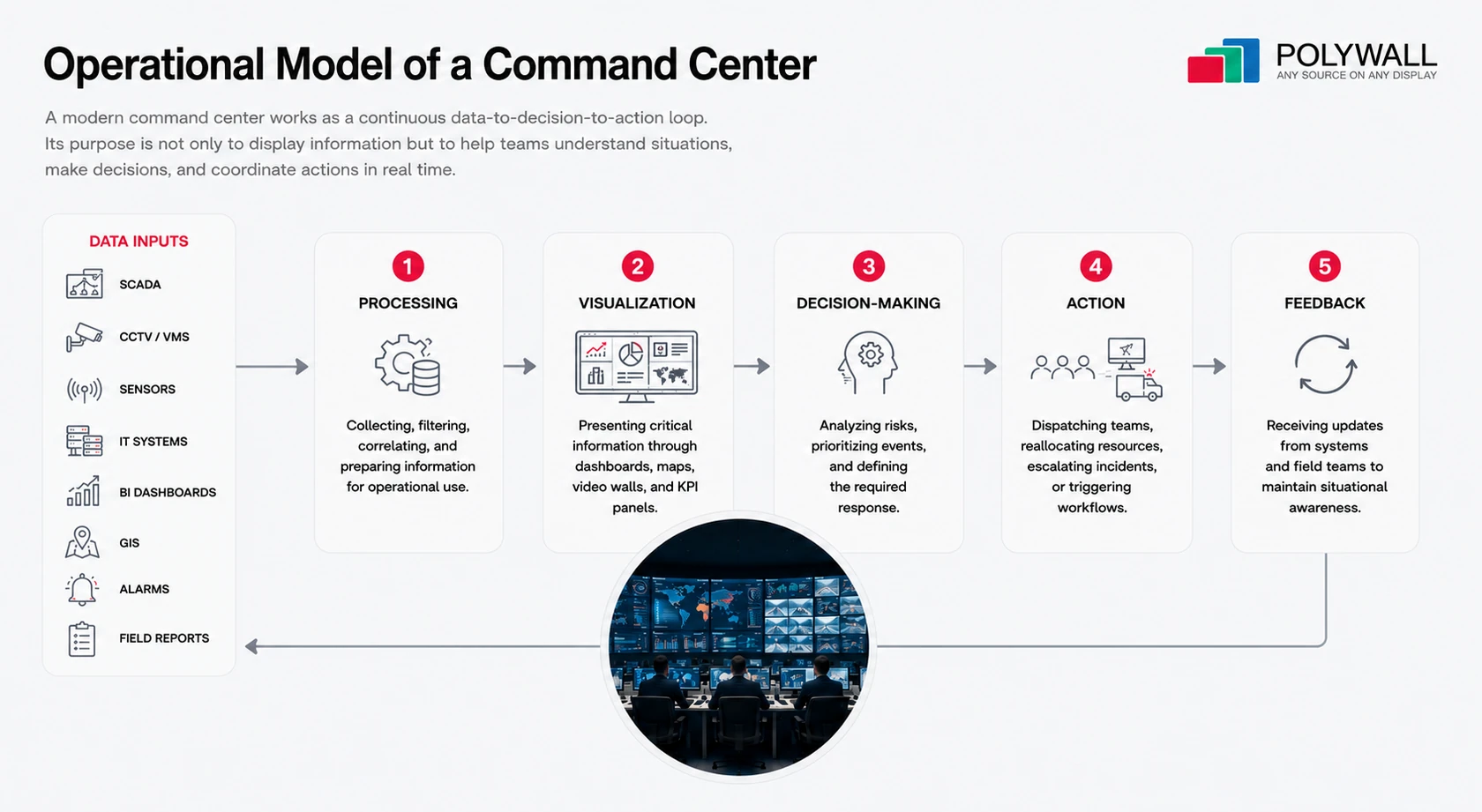
The operational flow usually includes:
Data inputs → Processing → Visualization → Decision-making → Action → Feedback
The visualization layer plays a key role by creating a shared operational picture for operators, supervisors, and decision-makers. Platforms such as Polywall help organizations manage multiple data sources, dynamic layouts, and operational scenarios across video walls and control room environments.
Data inputs → Processing → Visualization → Decision-making → Action → Feedback
- Data inputs: SCADA, CCTV, sensors, IT systems, BI dashboards, GIS, alarms, and field reports.
- Processing: collecting, filtering, correlating, and preparing information for operational use.
- Visualization: presenting critical information through dashboards, maps, video walls, and KPI panels.
- Decision-making: analyzing risks, prioritizing events, and defining the required response.
- Action: dispatching teams, reallocating resources, escalating incidents, or triggering workflows.
- Feedback: receiving updates from systems and field teams to maintain situational awareness.
The visualization layer plays a key role by creating a shared operational picture for operators, supervisors, and decision-makers. Platforms such as Polywall help organizations manage multiple data sources, dynamic layouts, and operational scenarios across video walls and control room environments.
Command Center Best Practices for Reliable Operations
An effective command center design process starts with operational requirements — not displays, furniture, or hardware. This keeps command center design aligned with real workflows and supports faster decision-making, collaboration, and reliable 24/7 operations.
The following best practices provide a foundation for building a modern operational environment:
The following best practices provide a foundation for building a modern operational environment:
1. Define Operational Objectives
Clearly identify the scenarios the facility must support, whether daily operations, incident response, crisis management, executive oversight, or a combination of these. These objectives will determine the room layout, operator roles, visualization strategy, and technology stack.
2. Design Around Workflows
The environment should help teams understand what is happening, what requires attention, who is responsible, what action should be taken, and whether the situation has been resolved.
3. Integrate Data Into One Operational View
Before selecting technology, identify required data sources — such as SCADA, CCTV, GIS, IT monitoring, BI dashboards, and incident management platforms — and ensure they can be unified.
4. Prioritize Situational Awareness
Visualization should improve clarity, not create information overload. Keep critical alerts, KPIs, maps, and operational status on the video wall, while detailed analysis remains on operator workstations.
5. Design for Flexibility and Reliability
A modern control environment should adapt to normal operations, incidents, and crises, while supporting scalability, redundancy, failover, and testing under real operational scenarios.
For a deeper understanding of control room planning, ergonomics, workstation layouts, display positioning, and environmental considerations, see our guide How to Design a Control Room: 7 Key Aspects.
Command Center Layout and Ergonomics: Practical Design Guidelines
A successful operations room is designed around people, workflows, and operational scenarios — not only screens and equipment. This section explains best practices for command center layout, including workstation placement, functional zones, video wall positioning, lighting, acoustics, and collaboration areas.
In practice, command center design should balance operator comfort, visibility, collaboration, and long-term scalability.
In practice, command center design should balance operator comfort, visibility, collaboration, and long-term scalability.
“
One of the most common mistakes in projects of this type is starting with the room layout or the size of the video wall instead of operational requirements. A more effective approach is to begin with operator roles, workflows, and real-life scenarios: who needs to see shared information, who makes decisions, how incidents are escalated, and how teams collaborate during normal operations and crisis situations.
A video wall should provide a shared operational picture—not replace operator workstations. Detailed analysis and system control belong at individual desks, while the video wall should highlight priorities, alerts, maps, camera feeds, and other information that can be understood at a glance. Combined with proper ergonomics, lighting, and acoustics, this approach improves situational awareness, reduces operator fatigue, and supports faster, more informed decision-making in 24/7 environments.
A video wall should provide a shared operational picture—not replace operator workstations. Detailed analysis and system control belong at individual desks, while the video wall should highlight priorities, alerts, maps, camera feeds, and other information that can be understood at a glance. Combined with proper ergonomics, lighting, and acoustics, this approach improves situational awareness, reduces operator fatigue, and supports faster, more informed decision-making in 24/7 environments.
A successful operations room is designed around people, workflows, and operational scenarios — not only screens and equipment. This section explains best practices for command center layout, including workstation placement, functional zones, video wall positioning, lighting, acoustics, and collaboration areas.
In practice, command center design should balance operator comfort, visibility, collaboration, and long-term scalability.
In practice, command center design should balance operator comfort, visibility, collaboration, and long-term scalability.
Start with workflows, not room size
Before planning desks and displays, define:
The number of workstations and room zones should follow operational processes, not available space.
- operational roles and responsibilities
- number of operators per shift
- collaboration requirements
- 24/7 operation needs
- incident and crisis scenarios
The number of workstations and room zones should follow operational processes, not available space.
Create functional zones
Typical functional areas include:
Zone
Purpose
Operator area
Monitoring, analysis, incident handling
Supervisor area
Escalation and operational control
Collaboration area
Crisis coordination and teamwork
Technical area
AV, servers, and network infrastructure
The final layout depends on the industry, workflow, and security requirements.
Design the video wall for situational awareness
The video wall should provide a shared operational picture, not replace operator screens.
It should display:
Detailed analysis and system control should remain on operator workstations.
It should display:
- dashboards
- maps
- camera feeds
- alerts
- KPIs
- incident information
Detailed analysis and system control should remain on operator workstations.
Design the video wall for situational awareness
Before launch, validate the environment with real workflows:
Testing real content ensures the environment supports actual decision-making.
- daily operations
- incident response
- crisis mode
- system failures
Testing real content ensures the environment supports actual decision-making.
Choose the right video wall technology: LED vs LCD
Choosing the right display technology depends on the operational requirements of the facility: room size, viewing distance, content type, budget, and reliability expectations.
LEDs are not always the only solution. In many NOC, SOC, and control room environments, LCD video walls can still provide the required resolution and performance.
LEDs are not always the only solution. In many NOC, SOC, and control room environments, LCD video walls can still provide the required resolution and performance.
Advantages and limitations of LED and LCD video walls
Video wall type
Best for
Advantages
Limitations
LED video wall
Large seamless visualization, executive operations rooms, high-impact environments
Seamless image, high brightness, flexible size, modern appearance
Higher initial cost, pixel pitch selection is critical
LCD video wall
NOC, SOC, control rooms, budget-sensitive projects
High resolution, mature technology, predictable cost
Visible bezels, fixed panel sizes, limited flexibility
Projection systems
Specialized environments or large-format displays
Large image size, can be cost-effective in some cases
Requires controlled lighting, more maintenance, lower brightness than LED
The best display technology is the one that matches the operational task. A mission-critical environment should be designed around readability, reliability, and workflow — not only screen size.
Design Ergonomic Workspaces and Comfortable Operating Conditions
Operator workstations for 24/7 shifts should include ergonomic furniture, properly positioned displays, sufficient workspace, and easy access to communication tools. Glare-free lighting, noise control, and well-planned collaboration areas help reduce fatigue and improve focus during routine operations and critical incidents.
For a detailed guide on ergonomic workstations, lighting, room layouts, display positioning, and other control room design principles, see our article A Step-by-Step Guide to Control Room Design.
For a detailed guide on ergonomic workstations, lighting, room layouts, display positioning, and other control room design principles, see our article A Step-by-Step Guide to Control Room Design.
Support Normal, Incident, and Crisis Modes
A modern control environment should adapt to different operational situations.
Normal mode: dashboards, KPIs, system status, routine monitoring.
Incident mode: alerts, affected systems, maps, camera feeds, response information.
Crisis mode: executive overview, multi-team coordination, and continuity information.
Dynamic layouts and control room software allow teams to switch between scenarios quickly instead of relying on fixed screen configurations.
Normal mode: dashboards, KPIs, system status, routine monitoring.
Incident mode: alerts, affected systems, maps, camera feeds, response information.
Crisis mode: executive overview, multi-team coordination, and continuity information.
Dynamic layouts and control room software allow teams to switch between scenarios quickly instead of relying on fixed screen configurations.
Technology Stack of Modern Command Centers
Modern control environments rely on a combination of physical infrastructure, AV systems, IT architecture, and software platforms. These components should not be designed as separate layers. They must work together as one operational ecosystem.
The core technology stack usually includes:
The video wall shows what is happening, while operator workstations support detailed analysis and response. Control room software connects these layers by managing sources, layouts, and scenarios for normal, incident, and crisis operations.
Modern command and control center solutions should combine visualization, software orchestration, redundancy, secure access, and scalable infrastructure into one operational ecosystem.
The core technology stack usually includes:
- Video walls — the shared awareness layer for the entire room. They display high-level dashboards, maps, alerts, camera feeds, and operational status for collective decision-making.
- Operator workstations — the deep control layer. Operators use them for detailed analysis, system interaction, investigation, configuration, and incident handling.
- Control room software — the orchestration layer that manages content, layouts, sources, user access, and visualization scenarios across video walls and workstations.
- AV systems — video processors, encoders, decoders, signal routing, audio systems, collaboration tools, and control interfaces.
- Networking infrastructure — switches, segmented networks, bandwidth planning, cybersecurity controls, and remote access architecture.
- Data integration layer — connections to SCADA, CCTV, VMS, GIS, IT monitoring, BI, ERP, CRM, alarm systems, and incident management platforms.
- Communication tools — voice, radio, intercom, video conferencing, and collaboration platforms for internal and external coordination.
- Technical infrastructure — servers, storage, backup systems, racks, UPS, cooling, and monitoring tools.
The video wall shows what is happening, while operator workstations support detailed analysis and response. Control room software connects these layers by managing sources, layouts, and scenarios for normal, incident, and crisis operations.
Modern command and control center solutions should combine visualization, software orchestration, redundancy, secure access, and scalable infrastructure into one operational ecosystem.
Video Walls in Modern Operations Environments
A video wall is a shared situational awareness interface that helps teams understand events, identify priorities, and coordinate decisions. It can combine multiple sources in one operational view, including:
The video wall shows “what is happening,” while operator workstations support detailed analysis and response. During incidents, layouts can change dynamically to highlight affected assets, response teams, live feeds, or crisis information.
Control room software turns the video wall into part of a larger operational ecosystem by enabling multi-source management, dynamic layouts, real-time updates, and scenario switching.
- dashboards and KPIs
- maps and GIS data
- camera feeds
- alarms and alerts
- incident timelines
- infrastructure status
The video wall shows “what is happening,” while operator workstations support detailed analysis and response. During incidents, layouts can change dynamically to highlight affected assets, response teams, live feeds, or crisis information.
Control room software turns the video wall into part of a larger operational ecosystem by enabling multi-source management, dynamic layouts, real-time updates, and scenario switching.
Role of Control Room Software in Command Centers
Control room software is the layer that connects technology, data, and decision-making. It transforms multiple disconnected sources into a unified operational environment.
Without this layer, teams often rely on separate dashboards, individual video feeds, and manual switching between systems. This increases complexity and slows down response during critical situations.
Modern control room software enables:
Without this layer, teams often rely on separate dashboards, individual video feeds, and manual switching between systems. This increases complexity and slows down response during critical situations.
Modern control room software enables:
- Multi-source integration — connecting dashboards, CCTV, VMS, SCADA, GIS, applications, and business systems.
- Visualization management — controlling video walls, operator screens, collaboration displays, and remote users.
- Dynamic layouts — adapting visual information for different teams, roles, and operational scenarios.
- Real-time updates — keeping displayed information aligned with current events.
- Scenario switching — moving between normal operations, incident response, crisis mode, and executive briefings.
“
In many projects of this type, the biggest challenge is not the lack of data but the fact that information is scattered across multiple systems - CCTV, SCADA, GIS, BI dashboards, monitoring tools, incident platforms, and business applications. When operators have to switch between disconnected systems, response times increase and decision-making becomes less effective. Control room software addresses this by bringing all critical information into a single operational view, organized by role, priority, and operational context.
The greatest value comes from scenario-based visualization rather than static screen layouts. During routine operations, teams may focus on KPIs and system health, while incidents require immediate access to alerts, maps, live video feeds, and response information. The ability to switch between these operational views transforms a video wall from a passive display into an effective decision-support tool.
The greatest value comes from scenario-based visualization rather than static screen layouts. During routine operations, teams may focus on KPIs and system health, while incidents require immediate access to alerts, maps, live video feeds, and response information. The ability to switch between these operational views transforms a video wall from a passive display into an effective decision-support tool.
This software layer creates structured operational views where operators, supervisors, and decision-makers work from the same real-time picture.
Instead of manually rebuilding screen configurations, teams can use predefined or dynamic layouts for different operational needs.
Polywall helps operations teams manage visual information across video walls and operator environments with multi-source content management, dynamic layouts, and fast scenario switching.
Instead of manually rebuilding screen configurations, teams can use predefined or dynamic layouts for different operational needs.
Polywall helps operations teams manage visual information across video walls and operator environments with multi-source content management, dynamic layouts, and fast scenario switching.
Reliability and Redundancy Requirements for 24/7 Operations Environments
Reliability is a core requirement for any 24/7 operations environment, control room, or situation center. It ensures operational continuity, safety, and incident response under normal load, peak conditions, and partial system failures.
1. Power and infrastructure redundancy
All mission-critical systems — video walls, servers, operator workstations, network and communication equipment — should be protected by UPS systems, with backup generators for extended outages. Redundant power supplies and separate circuits reduce the risk of a single point of failure.
2. Signal and network redundancy
Video, data, and control signals should have alternative paths so that a single failure does not remove critical visibility. This includes backup input sources, redundant routing, and failover configurations.
3. Software and operational continuity
Reliability must also extend to software. Control room platforms, visualization systems, and integration layers should support high availability, backups, and fast recovery procedures. If one system fails, operators must still be able to access key data through alternative interfaces.
4. SLA and service support
For critical infrastructure and 24/7 operations, reliability also depends on a clear service support model. An SLA should define response times, incident priorities, escalation procedures, support availability, and recovery expectations.
Service support may include remote diagnostics, on-site assistance, preventive maintenance, spare parts availability, software updates, and configuration backups. This ensures that the facility remains operational not only after launch, but throughout its full lifecycle.
Service support may include remote diagnostics, on-site assistance, preventive maintenance, spare parts availability, software updates, and configuration backups. This ensures that the facility remains operational not only after launch, but throughout its full lifecycle.
5. Degraded-mode operation
A well-designed control environment should support degraded modes instead of complete shutdowns. If a video wall controller or a subsystem fails, operators must still continue work via workstations or backup layouts. The system should fail gracefully without stopping decision-making.
Common Challenges in Command Center Implementation
Despite modern technologies, many projects of this type face recurring issues. Most of them are not caused by a lack of tools, but by weak integration and unclear operational design.
Typical challenges include:
These challenges highlight a key point: implementation of such an environment should be treated as an operational design problem, not just an AV or IT deployment.
Typical challenges include:
- Fragmented systems. Data is distributed across SCADA, CCTV, IT monitoring, BI dashboards, alarms, GIS, and business platforms. Operators are forced to switch between tools instead of working in a single operational view.
- Poor integration. Systems may be technically connected but not operationally aligned, making it difficult to correlate events and act on them in context.
- Information overload. Excessive dashboards, alerts, and video feeds create noise, making it harder to identify what actually requires attention.
- Slow decision-making. Without clear prioritization, teams spend time searching for data and manually escalating issues instead of acting.
- Static layouts. Fixed screen configurations do not adapt to changing operational conditions such as incidents or crises.
- Lack of coordination tools. Different teams often operate without a shared situational context, which leads to delays and miscommunication.
- Insufficient testing. Systems are sometimes validated technically but not tested against real operational scenarios such as incidents, peak load, or failures.
These challenges highlight a key point: implementation of such an environment should be treated as an operational design problem, not just an AV or IT deployment.
Business Value of a Well-Designed Operations Environment
A well-designed operations environment is more than an AV or infrastructure project—it is a strategic business asset that improves operational efficiency, decision-making, and business continuity. By centralizing information into a shared operational view, organizations can respond to incidents faster, reduce downtime, and improve coordination across teams.
A well-designed control environment helps improve key performance indicators such as response time, MTTR, and SLA compliance while providing executives and operational teams with real-time visibility into critical systems, KPIs, and potential risks. By integrating existing data sources into a unified environment, organizations can also simplify operations, support future growth, and reduce the total cost of ownership (TCO).
A well-designed control environment helps improve key performance indicators such as response time, MTTR, and SLA compliance while providing executives and operational teams with real-time visibility into critical systems, KPIs, and potential risks. By integrating existing data sources into a unified environment, organizations can also simplify operations, support future growth, and reduce the total cost of ownership (TCO).
Building a Future-Ready Operations Environment
Modern operations environments are evolving into strategic hubs where visualization, coordination, and real-time decision-making work together as a unified layer. As organizations manage more systems, locations, risks, and data sources, traditional monitoring rooms are no longer enough. Teams need flexible environments that can adapt to daily operations, incidents, crisis response, and executive oversight.
A future-ready control environment combines multi-source integration, dynamic visualization, reliable infrastructure, and collaborative workflows to help teams move from data to decision to action faster. Visualization and orchestration platforms play a key role by connecting video walls, operator workstations, dashboards, applications, and operational scenarios into one unified control environment.
Polywall helps organizations transform fragmented visual information into a structured operational picture. With dynamic layouts, multi-source content management, and scenario-based visualization, teams can respond faster and coordinate more effectively.
See how Polywall can transform your control room environment into a real-time decision-making hub. Request a Demo Today.
A future-ready control environment combines multi-source integration, dynamic visualization, reliable infrastructure, and collaborative workflows to help teams move from data to decision to action faster. Visualization and orchestration platforms play a key role by connecting video walls, operator workstations, dashboards, applications, and operational scenarios into one unified control environment.
Polywall helps organizations transform fragmented visual information into a structured operational picture. With dynamic layouts, multi-source content management, and scenario-based visualization, teams can respond faster and coordinate more effectively.
See how Polywall can transform your control room environment into a real-time decision-making hub. Request a Demo Today.
Get Free Consultation from Experts
Please share your situation and we’ll be happy to advise you.
Get a full overview of Polywall’s key functionality.
Demonstrate experience of the control room staff.
Show content management examples.
Create and manage several software sources – dashboards, remote workstation sharing, etc.
Investigate NDI camera workflow.
Check real cases and project diagrams.
Demo
After the demo session with our consultant, you will receive a fully-functional 30-days license of Polywall for free.
Read More
- 13.07.2026A major Central Bank responsible for regulating one of the largest financial sectors in Central Asia has implemented a Security Operations Center (SOC) powered by Polywall control room software.
- 10.07.2026Modern video walls need more than source display. Learn how a control room software layer connects dashboards, applications, remote access, KVM control, automation, security, and daily workflows.
Product
Industries
Support
About
© 2026 POLYWALL SOFTWARE SOLUTIONS FZE


/
Speak to an Expert