
Understanding Control Room KVM: Hardware, IP KVM and Browser-Based Control
21.08.2026
KVM (Keyboard, Video and Mouse) is a common term in control room and video wall projects, but its role is not always clear. This article explains how KVM control room workflows are built, how traditional hardware KVM works, and how software-based access changes the way teams interact with workstation-based sources.



What Does KVM Mean in a Control Room?
KVM stands for Keyboard, Video and Mouse. In a control room, this technology allows an authorized user to view and control a remote workstation from another console or interface. The user operates the workstation with keyboard and mouse input, while its output is displayed on the video wall.
KVM is used when operators need to interact with computers that are not physically located at their desk.
Many interactive sources on a video wall come from workstations: video management systems, SCADA applications, GIS tools, monitoring dashboards, incident platforms or other operational software. Displaying these sources gives the team a shared view of information.
In a KVM architecture, the workstation output is transmitted to the display environment or operator console, while keyboard and mouse commands are sent back to the workstation. In simple terms, the system combines video delivery with a return path for user input.
Many interactive sources on a video wall come from workstations: video management systems, SCADA applications, GIS tools, monitoring dashboards, incident platforms or other operational software. Displaying these sources gives the team a shared view of information.
In a KVM architecture, the workstation output is transmitted to the display environment or operator console, while keyboard and mouse commands are sent back to the workstation. In simple terms, the system combines video delivery with a return path for user input.
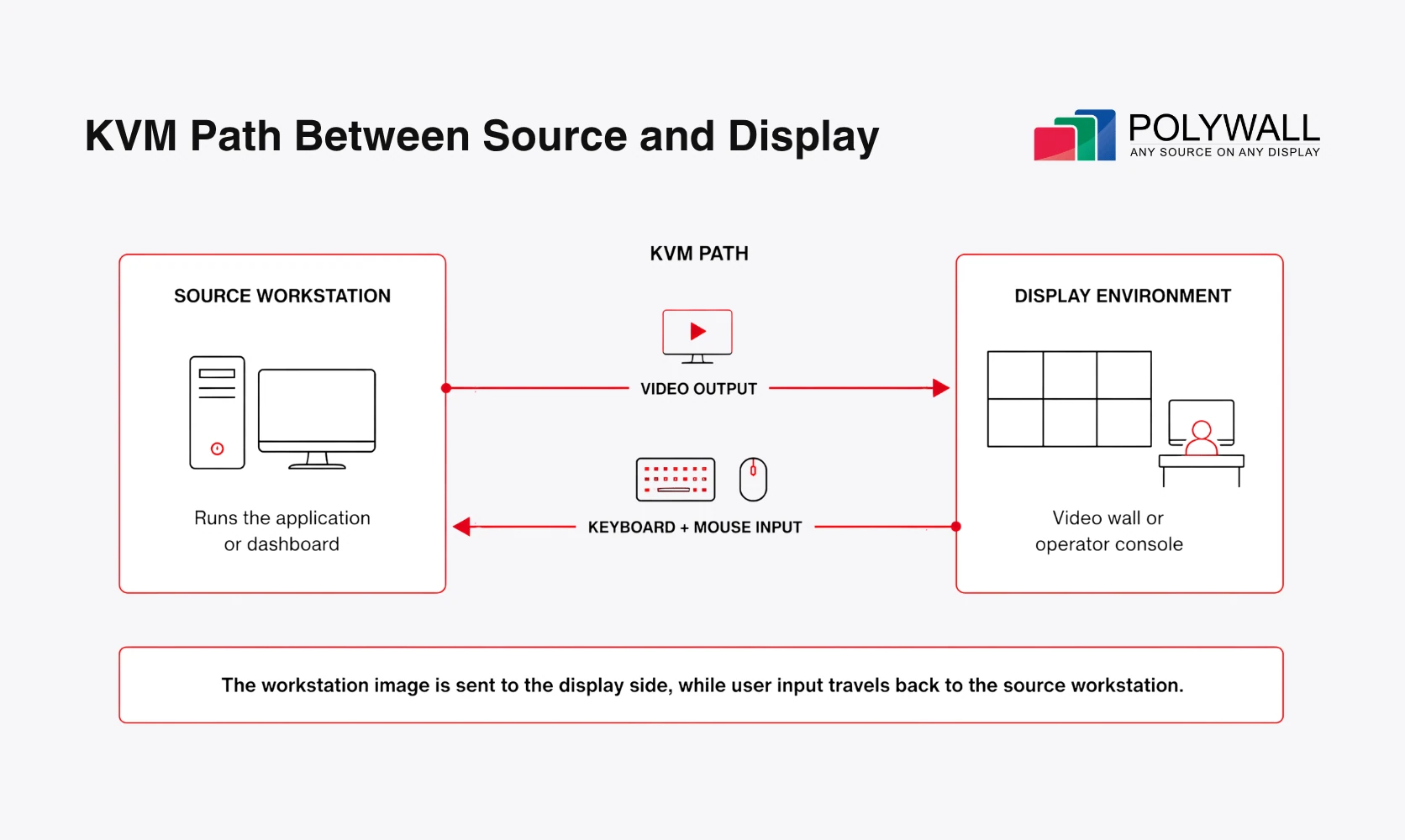
Operators can access and interact with workstations located in a separate server or equipment area
From an approved console or access interface, a control room user can:
Not every displayed source requires this type of interaction. If the goal is only to show content on the video wall, the source can be delivered through AV-over-IP transmission or, in simpler setups, through a direct video connection.
KVM becomes useful when the displayed source also requires user interaction. For example, an operator may need to search inside a dashboard, control a VMS, change a browser tab or enter commands on a remote workstation.
- click inside an application
- type commands or search queries
- scroll through data
- open, move or close windows
- navigate operational software
Not every displayed source requires this type of interaction. If the goal is only to show content on the video wall, the source can be delivered through AV-over-IP transmission or, in simpler setups, through a direct video connection.
KVM becomes useful when the displayed source also requires user interaction. For example, an operator may need to search inside a dashboard, control a VMS, change a browser tab or enter commands on a remote workstation.
The Traditional Hardware KVM Model
Traditional KVM is built around dedicated hardware placed between the controlled workstation and the operator console. Depending on the project, this can mean a simple local switch or a more advanced IP-based architecture
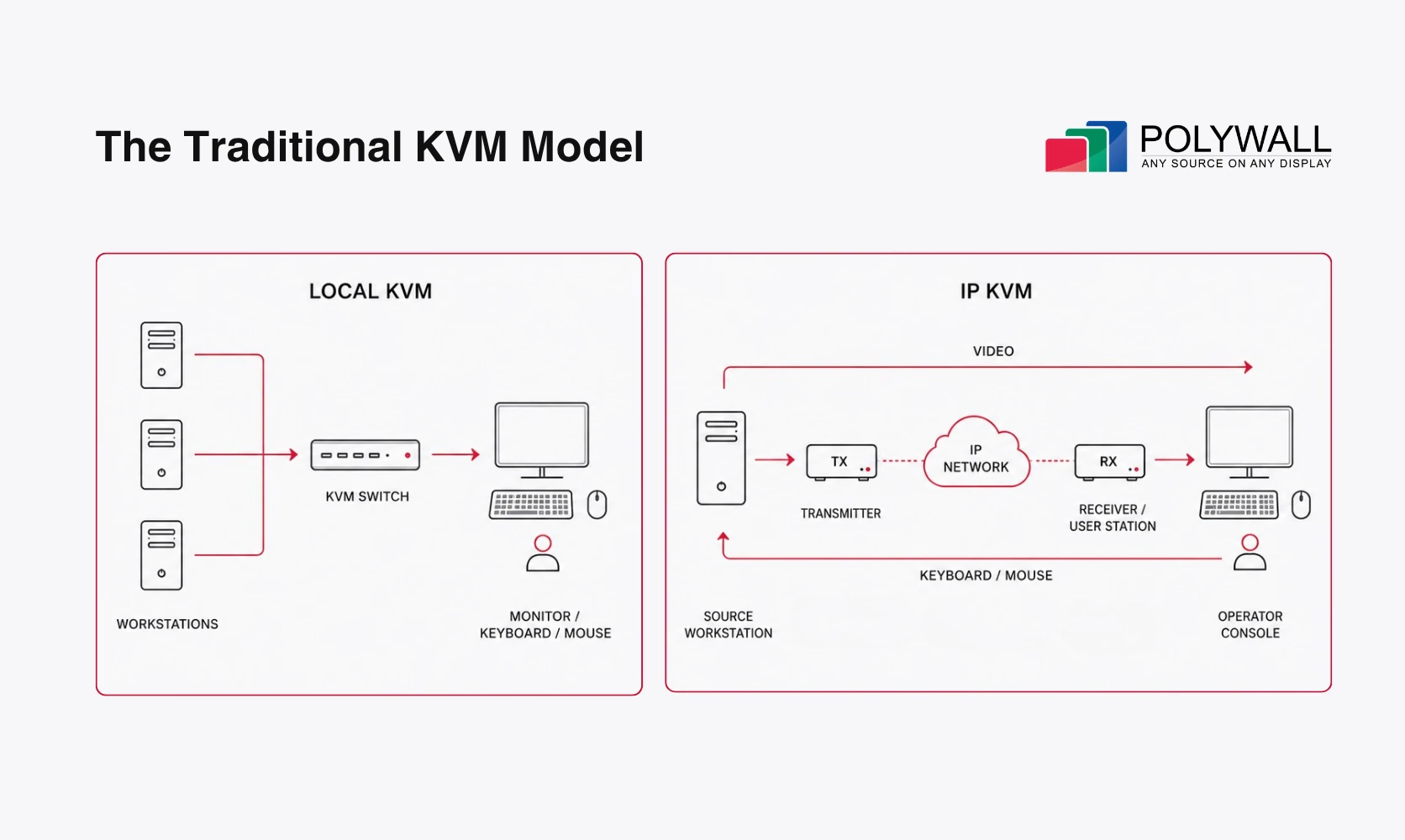
Traditional KVM architectures range from simple local switching to distributed access over an IP network
The Classic Local KVM Switch
The classic model is a local hardware switch. Several computers are connected to one KVM box, while the operator uses one monitor, keyboard and mouse. The switch connects this console to the selected computer, allowing the operator to switch between machines without changing desks.
This model is useful for simple local scenarios, such as desktop switching, server maintenance or small technical setups. In modern control rooms, however, a classic KVM switch is rarely the main architecture. Control room teams usually need distributed access, secure equipment rooms, multiple operator positions and integration with the video wall environment.
This model is useful for simple local scenarios, such as desktop switching, server maintenance or small technical setups. In modern control rooms, however, a classic KVM switch is rarely the main architecture. Control room teams usually need distributed access, secure equipment rooms, multiple operator positions and integration with the video wall environment.
IP KVM: The Network-Based Model
In larger KVM control room projects, workstation access is often implemented through IP KVM or an extended hardware architecture. Instead of using one local switch, the setup sends video from the source workstation to the operator side, while keyboard and mouse input travels back through a dedicated hardware and network path.
A typical IP KVM path may include:
In this setup, the transmitter sends the workstation’s video output toward the operator console. The receiver delivers that video to the operator side, while keyboard and mouse commands return to the source workstation.
This keeps computers in a server room, equipment rack or secured area, while operators work from the main room, another facility or an approved remote location. A well-designed IP KVM setup can centralize computers, reduce desk clutter, support fast switching and provide a smooth operator experience in fixed control room environments.
The limitation appears when more sources, virtual workstations or remote users need to be added. Each workstation that requires user interaction still has to be connected to the KVM environment, with dedicated devices, network design, permissions, security rules and maintenance.
When virtual desktops or virtual workstations are included, the architecture may also involve remote display protocols such as PCoIP (PC-over-IP). Remote users may also need dedicated client applications, often called thick clients, deployed and maintained on their devices.
A typical IP KVM path may include:
- a workstation or server running the application
- a transmitter or encoder near that workstation
- a copper cable, fiber link or IP network path
- a receiver, decoder or user station at the operator desk
- the monitor, keyboard and mouse used by the operator
In this setup, the transmitter sends the workstation’s video output toward the operator console. The receiver delivers that video to the operator side, while keyboard and mouse commands return to the source workstation.
This keeps computers in a server room, equipment rack or secured area, while operators work from the main room, another facility or an approved remote location. A well-designed IP KVM setup can centralize computers, reduce desk clutter, support fast switching and provide a smooth operator experience in fixed control room environments.
The limitation appears when more sources, virtual workstations or remote users need to be added. Each workstation that requires user interaction still has to be connected to the KVM environment, with dedicated devices, network design, permissions, security rules and maintenance.
When virtual desktops or virtual workstations are included, the architecture may also involve remote display protocols such as PCoIP (PC-over-IP). Remote users may also need dedicated client applications, often called thick clients, deployed and maintained on their devices.
When Hardware KVM Starts Defining the Architecture
Control rooms now work with far more software-based sources than before. Video feeds and workstation screens remain important, but many projects also include real-time dashboards, BI reports, AI video analytics, web applications, incident tools and KPI views. This changes how teams use the video wall. Instead of showing a few fixed workstation outputs, many rooms now need multi-dashboard layouts that users can display, compare and, in some cases, interact with during daily operations.
Hardware and IP-based systems can perform very well in fixed operator environments. A well-designed setup can provide a smooth user experience, fast switching between workstations and very low mouse latency, which is important when operators work with remote machines throughout the day.
The limitation appears when the number and variety of sources grow. In a hardware-centered model, interactive content is still tied to workstations, endpoints, video outputs and dedicated signal paths. More dashboards, applications and user scenarios usually mean more equipment, more source planning and more access rules.
Hardware and IP-based systems can perform very well in fixed operator environments. A well-designed setup can provide a smooth user experience, fast switching between workstations and very low mouse latency, which is important when operators work with remote machines throughout the day.
The limitation appears when the number and variety of sources grow. In a hardware-centered model, interactive content is still tied to workstations, endpoints, video outputs and dedicated signal paths. More dashboards, applications and user scenarios usually mean more equipment, more source planning and more access rules.
More Sources, More Hardware Planning
In a hardware-centered model, software sources mostly reach the video wall through dedicated workstation or server outputs.
Ten dashboards may require ten workstation outputs. If operators need to interact with them, those workstations also need to be connected to the KVM infrastructure.
This creates another practical limitation: a workstation used to show a dashboard on the video wall is often tied to that task. If someone uses the same workstation for another action, the displayed content may change as well.
This can add:
At a small scale, this model remains manageable. With ten, twenty or more sources, every new interactive source becomes another item to connect, configure and maintain.
Dashboards can also inherit the limits of the workstation output behind them. For example, if a dashboard is delivered as a 1920×1080 16:9 desktop output, the video wall receives that fixed resolution and aspect ratio. If the stream is placed into a larger area, a smaller area or a zone with a different aspect ratio, the image may be scaled or stretched. As a result, fine details and text can lose clarity and become harder to read.
Ten dashboards may require ten workstation outputs. If operators need to interact with them, those workstations also need to be connected to the KVM infrastructure.
This creates another practical limitation: a workstation used to show a dashboard on the video wall is often tied to that task. If someone uses the same workstation for another action, the displayed content may change as well.
This can add:
- KVM transmitters or encoders
- receivers, decoders or user stations
- network segments, cabling or fiber links
- security rules and user access policies
- maintenance for another hardware subsystem
At a small scale, this model remains manageable. With ten, twenty or more sources, every new interactive source becomes another item to connect, configure and maintain.
Dashboards can also inherit the limits of the workstation output behind them. For example, if a dashboard is delivered as a 1920×1080 16:9 desktop output, the video wall receives that fixed resolution and aspect ratio. If the stream is placed into a larger area, a smaller area or a zone with a different aspect ratio, the image may be scaled or stretched. As a result, fine details and text can lose clarity and become harder to read.
Where KVM Control Room Workflows Need Interaction
Displaying a workstation output does not automatically give operators control over it.
If the control room operator needs to change a browser tab, open a file, search inside a dashboard or operate a VMS, someone still needs access to the workstation itself. Without KVM, that may mean asking a colleague at the physical PC to make the change.
To add direct interaction, the workstation has to be connected to a dedicated access environment. In IP KVM projects, this usually means adding dedicated hardware and access rules for that workstation.
If the control room operator needs to change a browser tab, open a file, search inside a dashboard or operate a VMS, someone still needs access to the workstation itself. Without KVM, that may mean asking a colleague at the physical PC to make the change.
To add direct interaction, the workstation has to be connected to a dedicated access environment. In IP KVM projects, this usually means adding dedicated hardware and access rules for that workstation.
Remote Access Requires Another Layer
Control room workflows are no longer limited to the main control room operator desk:
IP KVM can support remote access, but these scenarios still have to fit the KVM architecture. They may also require specially prepared operator workstations with dedicated client applications, often called thick clients. Each new access scenario brings decisions about workstation placement, network routes, permissions, hardware, client deployment and long-term maintenance.
- a supervisor checks the wall from a laptop
- a manager opens the current view during a meeting
- an engineer compares data from a tablet on site
- another office requests controlled access to the same operational view
IP KVM can support remote access, but these scenarios still have to fit the KVM architecture. They may also require specially prepared operator workstations with dedicated client applications, often called thick clients. Each new access scenario brings decisions about workstation placement, network routes, permissions, hardware, client deployment and long-term maintenance.
A Key Trend: Moving KVM into the Control Room Layer
More dashboards, browser-based tools, remote access scenarios and distributed users are pushing control room projects toward software-defined architectures.
One of the clearest shifts is moving KVM from a dedicated hardware subsystem into the control room layer.
One of the clearest shifts is moving KVM from a dedicated hardware subsystem into the control room layer.
What is a control room layer?
A control room layer is a software environment around the video wall that launches application sources on demand and organizes dashboards, video streams, workstation outputs and other operational content into a shared visual workspace. It brings together AV-over-IP source delivery, secure user access, workstation interaction and on-premises browser-based work with the video wall.
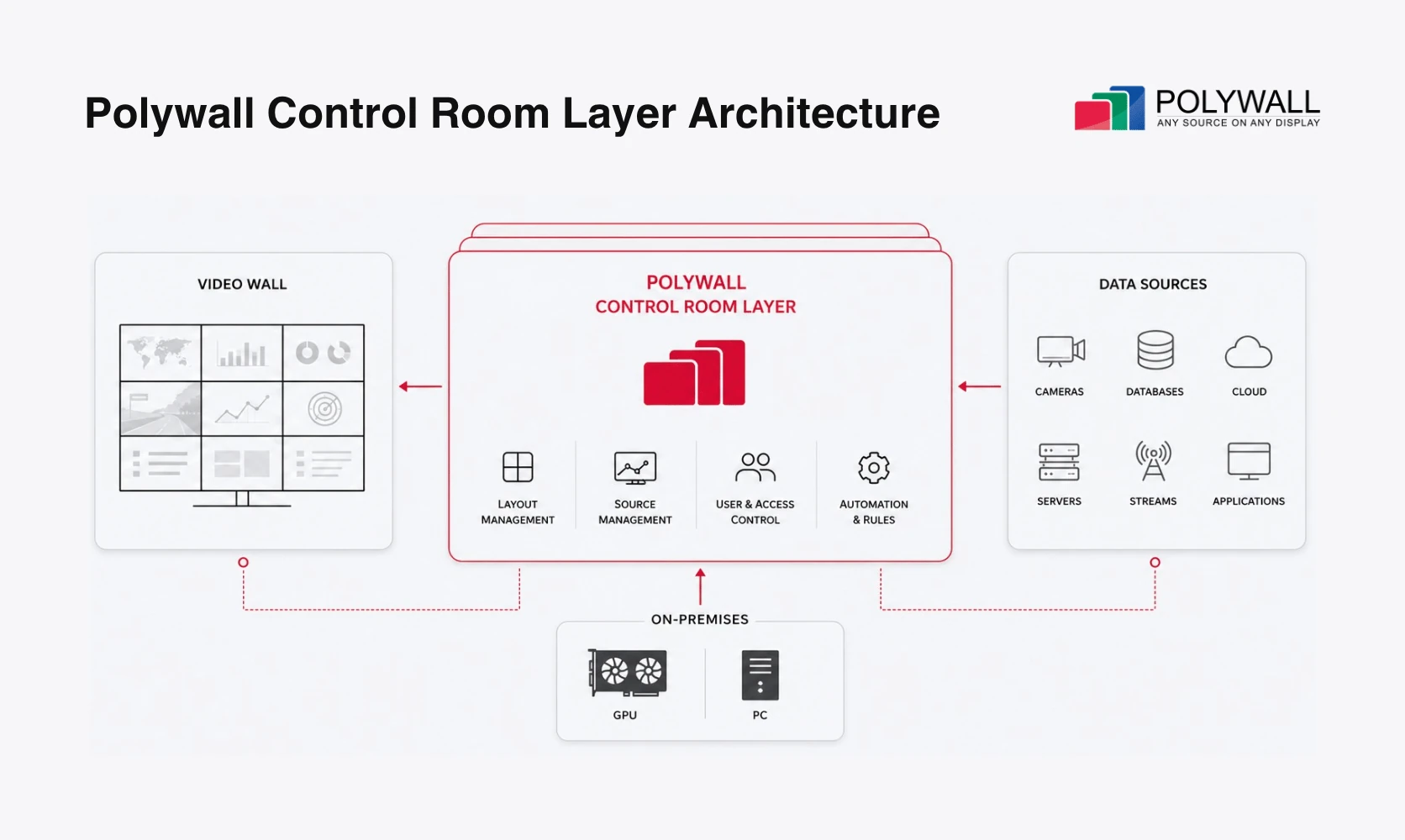
Polywall control room layer connects video wall, data sources, access and on-premises systems.
Instead of assigning a physical workstation to every dashboard or browser-based tool, this layer can open and manage software sources directly. BI reports, maps, KPI views and incident platforms can become part of the video wall environment without using a dedicated workstation output for each source.
A software-based layer can support:
Traditional hardware setups still have their place in fixed operator desks, secured technical rooms and specific infrastructure environments. For many daily workflows, teams need fewer hardware steps between a displayed source and authorized interaction.
A software-based layer can support:
- dashboards opened as software sources
- browser-based access for authorized users
- interaction from operator desks, laptops or tablets
- role-based permissions for viewing and operation
- workstation streaming and keyboard/mouse access where needed
- secure remote viewing and interaction with the video wall
Traditional hardware setups still have their place in fixed operator desks, secured technical rooms and specific infrastructure environments. For many daily workflows, teams need fewer hardware steps between a displayed source and authorized interaction.
Polywall KVM Where Needed for Browser-Based Interaction
Polywall applies this software-layer approach through KVM Where Needed, a browser-based capability available through - Polywall Lens.
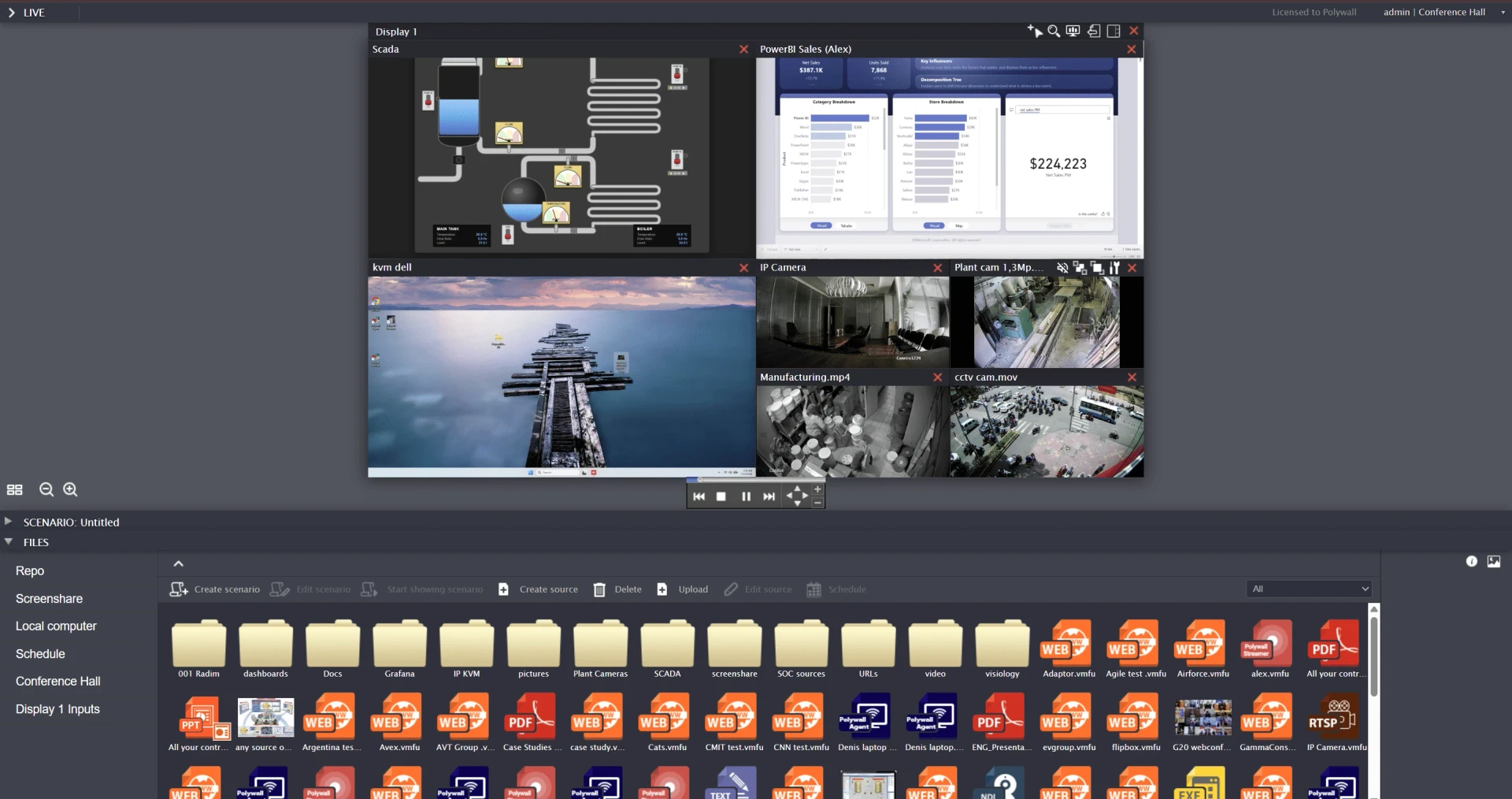
Configure a video wall layout in Polywall Designer and access published sources through Polywall Lens, a browser-based KVM for control rooms.
The feature extends Lens from video wall access to browser-based control of selected workstations where interaction is required. Users can view the wall, select a source and work with it directly through the same browser page.
Remote Video Wall Access
An authorized user opens Polywall Lens, authenticates, selects the complete wall ora specific workstation source, and works with it from the browser.
Access can be initiated from:
For external users, access can be provided through an approved VPN, under IT policy. No dedicated client application is required.
Access can be initiated from:
- an operator workstation
- a supervisor laptop
- a tablet or smartphone
- another office inside the corporate network
For external users, access can be provided through an approved VPN, under IT policy. No dedicated client application is required.
Turning Workstation Outputs into Interactive Sources
In many control rooms based on AV-over-IP technology, a workstation can be shown on the video wall but remain passive for the operator. The image is visible, but changing a tab, searching inside an application or operating a video management system still requires access to the workstation itself.
With KVM Where Needed, authorized users can control selected workstation sources published on the video wall through Polywall Lens:
With KVM Where Needed, authorized users can control selected workstation sources published on the video wall through Polywall Lens:
- click inside applications
- type with the keyboard
- scroll and navigate
- zoom into video wall content
- work from different devices
KVM Where Interaction Is Required
In traditional IP KVM projects, remote operations can shape the whole architecture. Operator consoles, source workstations and remote user positions often have to be planned around dedicated nodes, vendor-specific devices and access paths.
With Polywall, this capability becomes selective inside the software environment. Dashboards (browser pages) can be managed as software sources, while SCADA workstations can be given keyboard and mouse access only when interaction is required.
Polywall also adds practical modes for daily use:
With Polywall, this capability becomes selective inside the software environment. Dashboards (browser pages) can be managed as software sources, while SCADA workstations can be given keyboard and mouse access only when interaction is required.
Polywall also adds practical modes for daily use:
- Smooth Zoom for high-resolution video walls,
- View Only mode when users need visibility without control,
- Mouse Monopolization mode to reduce conflicts when several users access the same video wall
Bring KVM Where Needed to Your Control Room
Control room expectations are changing quickly. Teams need faster access to sources, direct interaction with workstation-based applications, and support for users beyond the main operator desk.
Polywall KVM Where Needed was designed for these workflows: browser-based access, selective workstation control, smoother navigation, and practical modes for operators, supervisors, and remote users.
See how browser-based KVM works inside your control room workflow.
Book a demo and request a 30-day trial.
Polywall KVM Where Needed was designed for these workflows: browser-based access, selective workstation control, smoother navigation, and practical modes for operators, supervisors, and remote users.
See how browser-based KVM works inside your control room workflow.
Book a demo and request a 30-day trial.
Get Free Consultation from Experts
Please share your situation and we’ll be happy to advise you.
Get a full overview of Polywall’s key functionality.
Demonstrate experience of the control room staff.
Show content management examples.
Create and manage several software sources – dashboards, remote workstation sharing, etc.
Investigate NDI camera workflow.
Check real cases and project diagrams.
Demo
After the demo session with our consultant, you will receive a fully-functional 30-days license of Polywall for free.
FAQ
KVM stands for Keyboard, Video and Mouse. In a control room, it lets an authorized user view a workstation output and send keyboard and mouse input back from another console or access interface. KVM is useful when operators need to work with computers that are not physically at their desk.
KVM over IP, or IP KVM, is a network-based approach for workstation access. It sends video to the operator side over an IP network, while keyboard and mouse input travels back to the source workstation. This allows computers to stay in a server room, equipment rack or secured area.
A typical setup includes a source workstation, transmitter or encoder, network path, receiver or user station, and the operator’s monitor, keyboard and mouse. The transmitter sends video toward the operator side. Keyboard and mouse commands return through the same path to the source workstation.
Classic KVM usually refers to a local hardware switch. Several computers connect to one box, and the operator uses one monitor, keyboard and mouse to switch between them. KVM over IP follows the same principle, but extends access over a network for larger or distributed environments.
Yes. In a software-based approach, KVM can be available through browser-based access instead of a dedicated client application. With Polywall Lens, authorized users can view the video wall, select a workstation source and interact with it from the same browser page, where keyboard and mouse access is enabled.
Read More
- 20.08.2026Join AV Hub Tech and Polywall on August 25 to explore the control room layer and approaches to source interaction, remote access, scenario switching, permissions, and IT alignment.
- 20.07.2026Learn how to design and build an effective mission-critical operations hub. This guide explains command center best practices, including workflows, room layout, video walls, control room software, redundancy, SLA support, and business value for 24/7 environments.
Product
Industries
Support
About
© 2026 POLYWALL SOFTWARE SOLUTIONS FZE


/
Speak to an Expert